2011年2月18日星期五

Tutorial Blog2:(Lossy vs. Loseless compression)

Tutorial 2: (Lossy vs. Loseless compression)
This week I am going to talk about the differences between Lossy and Loseless compression. Many of you may ask the same questions about what are Lossy and Loseless compressions. Simply, let’s start off with some terminologies.
Losseless compression is a class of data compression algorithms that allows the exact original data to be reconstructed from the compressed data. It laminates redundancy in the images in order to save space.
Lossy compression is a data encoding method which compresses data by discarding (losing) some of it. The procedure aims to minimize the amount of data that needs to be held, handled, or transmitted by a computer.

Lossless data compression is used in many applications.  It can be used for archiving your original data so that you can edit later without losing any data. Editing and archiving are two places where lossless is an ideal. Zip file format is a perfect example of Lossless compression. By contrast, Lossy compression is most commonly used to compress multimedia data (audio, video, still images), especially, it is largely used for website by delivering your content to web customers or other uses.


The first image is the Lossless image, we can still have the same image quality, but the size of image is much smaller. Moreover, the second image is Lossy image, as you can see at the image (d) we are dramatically losing the quality of the image. The image looks so jagged.

There are four kinds of image file formats BMP, GIF, JPG, and PNG. Each format has its pros and cons, let’s take a brief look about the differences among these formats.
BMP- “Bitmap” is most common in Windows environments for uncompressed images.
GIF- “Graphical Interchange File” is a compressed technic that will throw out redundant pixels to save space. There is no loss of quality with GIF; however, it does lose the color depth information. GIF files are small and have capabilities to create animation images.
JPG- Joint photographic Experts Group is a commonly used method of lossy compression for digital photography (image). It is the most common format for storing and transmitting photographic images on the website visitors.
PNG- Portable Network Graphic is becoming increasingly popular. PNG files are typically lossless and very nice for presenting extremely high resolution images to users. Both GIF and PNG have transparent capability.  
I hope some of you will get a better understanding of what Lossless and Lossy compressions are and better recognition of four types of image file format. When someone ask you about these relevant questions in the future, you have the ability the answer them all.

Work cited
http://en.wikipedia.org/wiki/Lossless_data_compression
http://computer.yourdictionary.com/lossless-compression
 

2011年2月8日星期二

Excel Project

I was excited and little bit nervous to start the Excel Project because I haven’t used Excel for a long time. I was already familiar with some basic skills of the excel spreadsheet and knew how to perform most of the instruction required; however, I was still astonished what a vital and useful tool Excel is for personal and professional during the process of the project.
 In Excel Project, I analyzed a variety data and evaluated the effectiveness of a large fitness center’s particular workout. There were data of 500 subjects-age, sex, and 21 heart rate measurements from time 0:00 to time 20:00. The 1st step was formatting the Raw Data sheet how to bold the headings for emphasis, how to center the date name, and how the use the “Freeze Panes” capability to lock the certain rows on the screen, when you scroll downward, the “lock” row(s) should always be displayed. All of these formats make date easy to be seen. The 2nd step was to create many formulas in order to do the calculation of MaxHR, TgtHR, HighestHR, TgtAchieved, and PctIncrese. I should say Excel makes our life easier. For instance, I created particular formula to calculate Max HR at first column, as soon as I got the value I just simply clicked the copy button and then dragged the entire column and press Enter key. Excel will automatically calculate the rest value for you. And the 3rd step was print setup for Raw Data. The project was pretty straightforward, and I really enjoyed when I was working on the Excel project. It was a really good learning experience and really fun.
The most important skill I learned during Excel Project was using the Pivot Table to analyze data. Coming to the segment lecture about Pivot Table, I have to be honest with you I have never heard this terminology before. What is Pivot Table? Pivot table is a fabulous way to break down an enormous group of data into a small, easy to ready table. It is extremely convenient and efficient tool  for business.Take a look at the AvgIncrease Table from screen capture that I created above. Instead of looking at the bounch numeric data, the Pivot Table looks more appealing.

2011年1月28日星期五

Tutorial Blog1: How to choose the PC?

Computers are everywhere: at school, at work, and at home. In today's informational world, we're all required to have a computer and to know some fundermental computer skills to enhance work performance.  I chose my new laptop by following the criteria that I have learned during the first 4 weeks of  lecture.
How to choose the right laptop?
First of all, Lets take a look inside the computer system. There are some key components inside the computer CPU, hard drive, and RAM. These three component make me to consider how to choose the computer .

CPU: The processor, also called the central processing unit, interprets and carries out the basic instructions that operate a computer. Since the processor significantly impacts overall computing power and manages most of a computer's operation, I have chosen Intercore I5 processor for my new laptop.
The Intelcore I5 processor delivers the next level of productivity. With the Intel Turbo Boost Techonology 2.0, this quad-core processor delivers high speed performance whenever you need it and security features to help protect information and data.


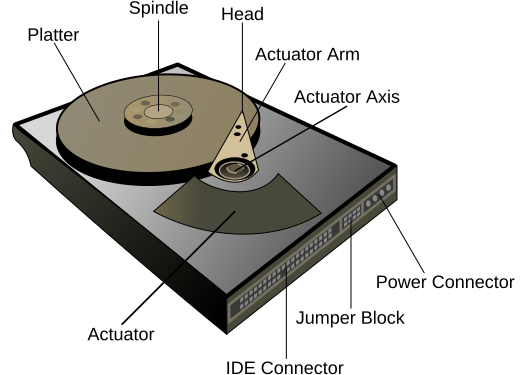
Hard drive: It is a storage device that stores data, instructions, and information. The key attributes of a hard drive are access time( the shorter the better ), rotational speed( it depends on the use case), and latency. Obviously, the capacity of  storage data depends on size of hard drive. Therefore, I chose 600GB hard drive for my laptop.File:Hard drive-en.svg

RAM( random access memory):  The word "RAM" is often associated with valotile types of memory where the information is lost after the power is switched off. Having sufficient amount of RAM in the system is critical. The bigger amount of RAM  you have in your computer means better performance. I have 4GB RAM in my laptop,  and it is enough for me as a student status.


I should say I barely have any knowledge about computer system before taking ISM class, i figured out that it is a very useful and interesting class. I used what i have learned from week 1-4 classes and bought a new laptop by my own. Even though i am not professional at some points , I hope I still can benefit some of you .


Work Cited
Shelly, Gary and Misty Vermaat, Discovering Computers 2010, Boston, MA: 2010 Course Technology, 2010